

Microsoft Copilot continues to evolve, and its latest feature is a major win for productivity: chat history filtering. If you've ever found yourself scrolling endlessly through past Copilot conversations trying to find that one brilliant insight or key instruction, this update is for you.
🔍 What Is Chat History Filtering?
Chat history filtering allows users to search and sort through previous Copilot interactions with ease. Instead of manually scrolling through a long list of chats, you can now apply filters to quickly locate specific conversations based on keywords, topics, or dates.
This is especially useful for professionals who rely on Copilot for:
- Drafting emails or documents
- Coding assistance
- Research summaries
- Meeting prep and follow-ups
- Brainstorming sessions
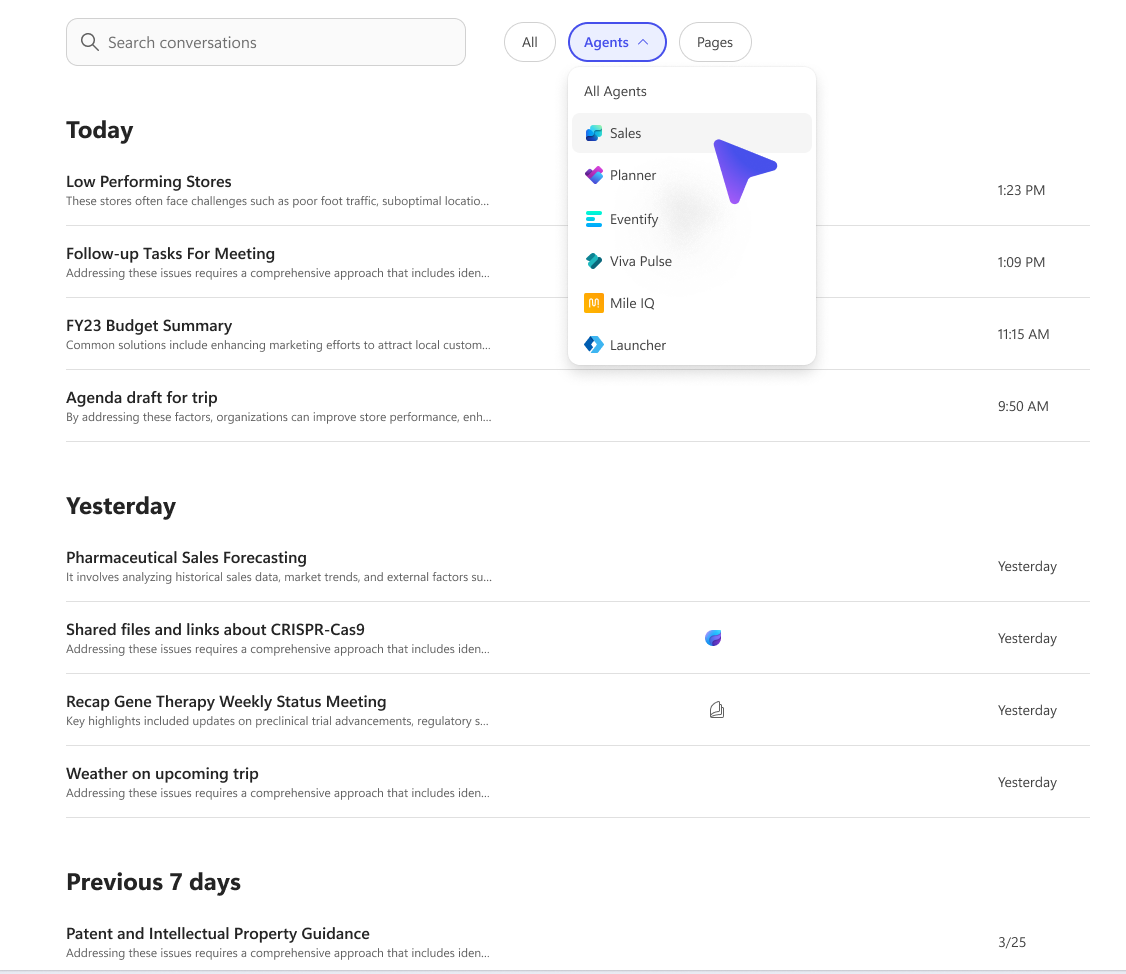
🚀 Why It Matters
Before this update, users had access to a chronological list of chats—helpful, but not efficient. Now, with filtering, you can:
- Quickly revisit key conversations without scrolling
- Recover lost context from previous sessions
- Boost productivity by reducing time spent searching
- Improve collaboration by referencing shared Copilot outputs
This feature is on by default, meaning no setup is required. It’s designed to be intuitive and seamlessly integrated into your existing workflow.
📅 Rollout Timeline
Microsoft is deploying this feature across its cloud environments in phases:
- Worldwide (Standard Tenants): Late August – Early September 2025
- GCC & GCC High: Late September – Early October 2025
- DoD (Department of Defense): Late September – Late October 2025
If you're in one of these environments, expect to see the feature appear automatically in your Copilot interface.
🏢 What This Means for Your Organization
For teams and enterprises, chat history filtering can:
- Streamline internal workflows
- Enhance training and onboarding by making past Copilot sessions easier to reference
- Support compliance and documentation by enabling quick access to AI-generated content
✅ Compliance & Security
Microsoft has confirmed that this update poses no compliance risks. It adheres to existing data governance and privacy standards, and no admin action is required to enable or manage it.
Still, it’s a good idea to:
- Inform your users about the new feature
- Update internal documentation or training materials
- Encourage feedback to optimize usage
📘 Final Thoughts
Chat history filtering is a small change with a big impact. It empowers users to work smarter, not harder—turning Copilot into an even more valuable partner in daily tasks.
Stay tuned for more updates, and if you’d like help integrating Copilot into your team’s workflow or training programs, feel free to reach out.